 Zed Industries / zed.dev
 Zed 1.3.5 and 1.3.6: Terminal Threads Are Stable, Mermaid Renders in the Agent, Gemini 3.5 Flash Arrives
Zed 1.3.5 ships Terminal Threads as a stable feature, letting developers run Claude Code, Codex, Amp, or any CLI agent as a managed thread in the sidebar. Mermaid diagrams now render inline in the agent panel. Version 1.3.6 follows with Gemini 3.5 Flash and thinking levels for Google models.
Zed Industries shipped version 1.3.5 on May 20 and followed with 1.3.6 on May 21. Together they represent one of the more interesting releases this month: Terminal Threads moves from preview to stable, Mermaid diagram support lands in the agent panel, and Gemini 3.5 Flash becomes available as a provider.
Terminal Threads
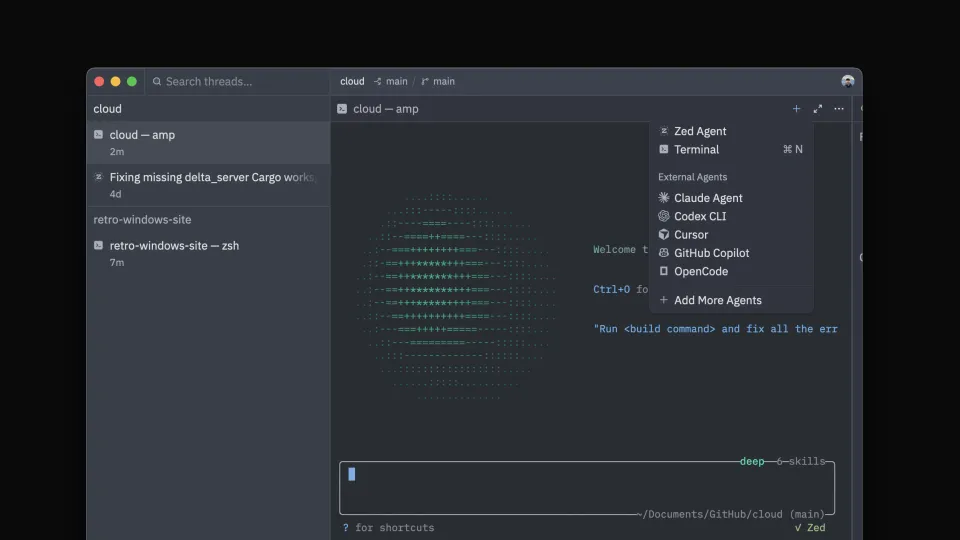
The headline feature of 1.3.5 is Terminal Threads, which are stable across all platforms. The idea is straightforward: you can now open a terminal inside the Agent Panel and it behaves like any other thread in the sidebar, with an auto-updating title, keyboard navigation, and notifications.
You start one by clicking the + icon in the Agent Panel toolbar and choosing Terminal. Each terminal thread gets its own sidebar entry and you can run as many as you like, mixing them with Zed Agent threads and ACP connections in the same project.
The practical value here is that tools like Amp, Claude Code, and Codex all live in the terminal, not the editor. Before Terminal Threads, running those agents meant keeping a separate window open and context-switching between them and your editor. Now they sit in the same sidebar as your agent panel threads.
This is also useful economically. Anthropic’s Agent SDK runs against its own subscription credit system in ACP integrations, while Claude Code via a terminal thread runs against your Claude subscription directly. For heavy users, the terminal path is significantly cheaper.
Mermaid diagrams in the agent
Zed’s agent panel can now render Mermaid diagrams inline. If an agent outputs a Mermaid diagram block, you see the rendered diagram rather than the raw syntax. Diagrams also match the editor’s current theme by default, so they don’t clash with dark mode.
Inline image rendering landed at the same time, covering both images from the filesystem and images returned by MCP tools.
Git panel: branch history
The Git panel in 1.3.5 adds a history view that shows all commits for the current branch. You can also run custom Git commands from the Git Graph context menu. Other Git additions: force-delete for worktrees with modified or untracked files, a “Copy Tag” action in the Git graph, and a confirmation prompt before deleting unmerged branches (with alt+click to skip it).
Other notable changes in 1.3.5
A new subagent_model setting lets you specify which model is used when an agent spawns a subagent, independent of the model you’re using in the main conversation.
Skills directory protection now requires user confirmation before an agent modifies files inside .agents/skills/ (per-project) or ~/.agents/skills/ (global). This is a meaningful guardrail — a misconfigured or malicious agent cannot silently overwrite skills without you noticing.
Anthropic now fetches its available models dynamically from the API rather than using a hardcoded list, so new models show up in the provider without requiring a Zed update. AWS Bedrock gained support for guardrail configuration via guardrail_identifier and guardrail_version settings. Model support was extended to grok-4.3, grok-4.2, and the gpt-5.4-nano and gpt-5.4-mini variants. Bash also got a built-in language server.
1.3.6: Gemini 3.5 Flash and thinking levels
Version 1.3.6, the following day, adds Gemini 3.5 Flash to the Google AI provider. It’s Google’s fastest current model and it’s now selectable directly in the model picker alongside Gemini 3.1 Pro and other Google models.
The release also adds thinking levels for Google models — the same concept available for Anthropic models, letting you control how much of the model’s budget goes toward reasoning before it responds.
Sources: Zed 1.3.5 release notes, Terminal Threads blog post, Zed 1.3.6 release notes