 GitHub Blog
 GitHub Launches a Standalone Copilot Desktop App in Technical Preview
GitHub's new native desktop app lets developers start agentic coding sessions directly from issues and pull requests, with each session running in an isolated branch and workspace. The app shipped v0.2.4 on May 15 with queued messages and collapsible tool-call panels.
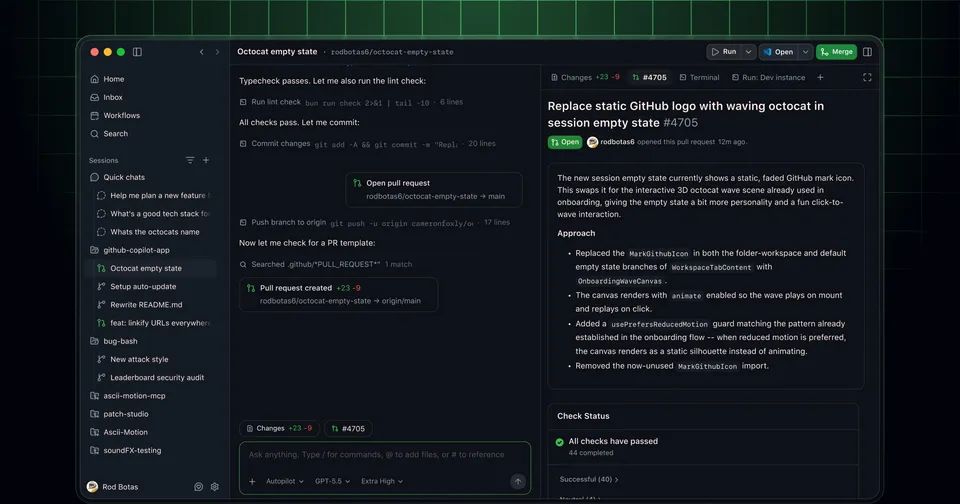
GitHub shipped a standalone desktop app for Copilot this week, putting it in technical preview for Copilot Pro and Pro+ subscribers. The app is a separate product from the VS Code extension. It runs on Windows, macOS, and Linux, and the idea is to give agentic sessions a first-class native home outside any IDE.
The core workflow centers on GitHub artifacts. You start a session from an issue or a pull request rather than opening a blank workspace. The app loads the repository context, creates an isolated branch for the session, and keeps everything scoped to that task. You can pause a session, come back to it, or run several in parallel. When the agent finishes, you review the diff, run the integrated tests, and open a pull request without leaving the app.
What shipped this week
GitHub released three builds in quick succession. v0.2.2 landed May 14 with a folder tree for navigating workspace files, column visibility controls for the My Work table view, and a redesigned home screen that shows inbox previews. Agents can now share and interact with the integrated browser preview, and canvas and browser tabs can split side by side.
v0.2.3 followed the same day with right-click context menus in the inbox list view and session automations as an opt-in experiment. Automations let you schedule repeating prompts, so you can set a session to run every morning on a specific issue or repo. Skills show up as slash commands on the home screen and inside draft workspaces.
v0.2.4, released May 15, added two things worth noting. First, queued follow-up messages: you can send a follow-up while a session is still active, and the app holds it until the current step finishes. Second, consecutive tool calls are now grouped into collapsible panels with a natural-language summary, which makes long agent runs easier to read without scrolling through dozens of individual tool outputs.
How access works
Copilot Pro and Pro+ subscribers can sign up for early access. Business and Enterprise subscribers get access as the rollout continues through the week, but org and enterprise admins need to enable previews and the Copilot CLI in their policy settings first.
GitHub also released two related features alongside the app. Auto model selection in the cloud agent picker now routes requests to a healthy model automatically when the setting is “Auto.” The agent tasks REST API entered public preview for Business and Enterprise, letting teams trigger cloud agent sessions programmatically from their own tooling.
The desktop app follows a design pattern Anthropic started with the Claude Code Desktop app and that OpenAI has been building toward with Codex remote-control: the agent session as a managed object you can inspect, queue work into, and hand off between surfaces. GitHub’s version leans hard on the GitHub graph as the entry point, which makes sense given that most Copilot users already live in Issues and PRs.