 Cursor / cursor.com
 Cursor 3.4 and 3.5: Full-Screen Tabs, Dev Environments, Automations, and Jira
Cursor shipped 3.4 on May 13 and 3.5 on May 20, adding full-screen agent tabs, Dockerfile-based cloud development environments, expanded Automations with multi-repo support, and a native Jira integration.
Cursor put out two releases in the past week. Version 3.4 shipped May 13, and version 3.5 followed on May 20. Together they add full-screen mode for agent tabs, cloud development environments with Dockerfile support, expanded Automations with multi-repo capability, and a new Jira integration.
What’s in 3.4
Full-screen tabs and compact chats
The Agents Window now has a full-screen mode that maximizes the right panel so you can focus on a single tab. Files, diffs, canvases, PRs, browsers, and terminals all expand to fill the working area. The agent chat is replaced by a floating prompt bar when you’re in full-screen mode. You can toggle it with the expand button in the panel header, the command palette, or Cmd/Ctrl+Shift+M.
Compact chats give a tighter view of agent conversations, making threads easier to scan. Tool call density is adjustable: Compact, Balanced, or Detailed, depending on how much intermediate output you want visible.
Development environments for cloud agents
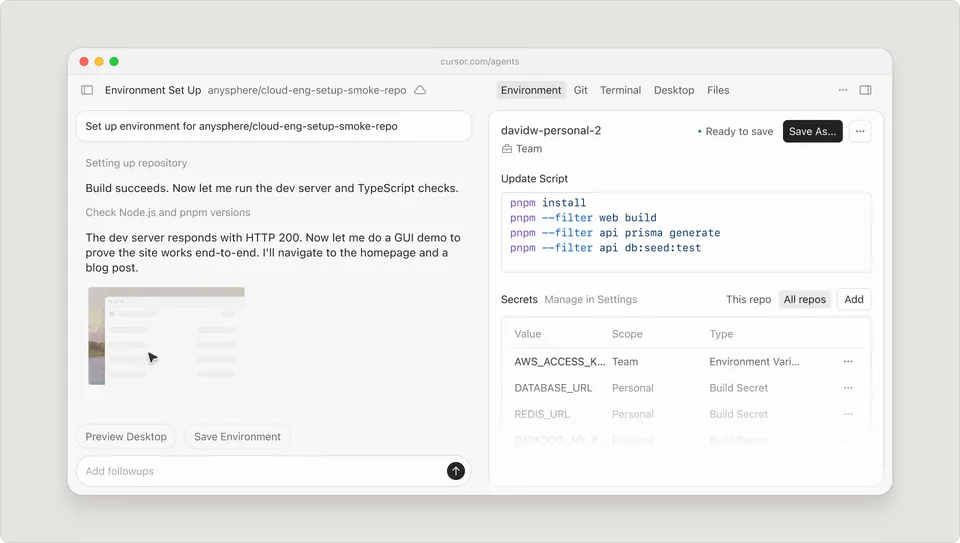
The bigger addition in 3.4 is cloud agent development environments. These let you configure the execution context for cloud agents with a Dockerfile, so the agent runs in a reproducible, project-specific environment rather than a generic sandbox.
Key details: build secrets for private package registry access, 70% faster cached builds through improved layer caching, version history with rollback, audit logging, environment-scoped secrets, and egress controls. This is the kind of infrastructure enterprise teams need before they can run agents autonomously on real codebases.
What’s in 3.5
Automations improvements
Automations, Cursor’s system for scheduling recurring background agent tasks, got two significant upgrades in 3.5.
Multi-repo support lets you attach multiple repositories to a single automation so agents can reason across all the required context. Previously each automation was scoped to one repo. For teams with split codebases or shared library dependencies, this is the difference between Automations being useful and being too limited to bother with.
No-repo automations open up Automations to non-code tasks entirely. Five new marketplace templates ship with 3.5: a Slack digest agent, a product analytics agent, a product FAQ agent, a product finance agent, and a customer health agent. These run without a repository, which means you can use Automations for workflows that aren’t directly about editing code.
Automations are also now accessible from inside the Agents Window, not just at cursor.com/automations. Newly created automations get 50% off agent runs for the first seven days.
Cursor in Jira
A new native Jira integration lets you assign issues directly to Cursor from within Jira, or mention @Cursor in issue comments to hand off a task. The agent can fix bugs, add features, update tests, or investigate issues from the Jira context.
This requires Cursor admin access and Jira Commercial Cloud with Atlassian’s Rovo feature enabled. If your team is already running Jira Cloud, it’s a direct integration without extra middleware.
Context
Cursor 3.3 (May 7) added a PR review experience with Build in Parallel, which runs tasks through async subagents concurrently. 3.4 and 3.5 are building on that foundation by making the Agents Window more usable for sustained work (full-screen, compact chats) and extending agent reach to multi-repo environments and non-coding workflows.
The development environments addition in 3.4 is the most structurally significant change. Running agents in Dockerfile-configured environments with proper secrets management and egress controls is what separates a demo from a production workflow. Cursor is positioning for teams that want to delegate real work to agents, not just use them as an interactive coding assistant.